
February 28, 2014 06:09 by
 Diego
Diego
I'm trying to figure out how to properly call a modal popup for my page using Controllers as per this post's suggestion.
Do you know what "modal windows" are? They are windows that, once opened, they do not provide any interaction with the rest of the windows in the application. In our application if we want to display confirmation dialogs then we can use these modal windows to get confirmation from the user. If we need to interact with the rest of the windows we must have to provide some response like Ok or cancel or close, then we can only interact with other windows in our application. This article provided an overview of the jQuery Mobile application in the ASP.NET MVC 5.1.1 project template using Visual Studio 2013. This post is my attempt to answer that question it’s as much for me to remember how I did it as it will hopefully be helpful to you to see how I accomplished it.

So, here’s the Step By Step – I hope you enjoy it!
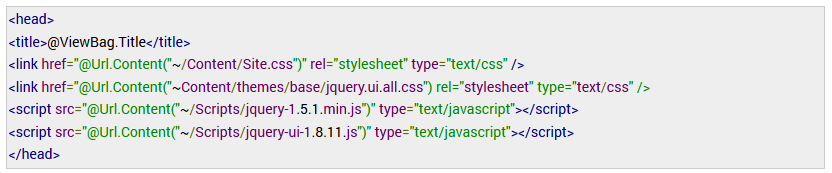
Step 1 : Firstly you will need to import the following jquery and css files.
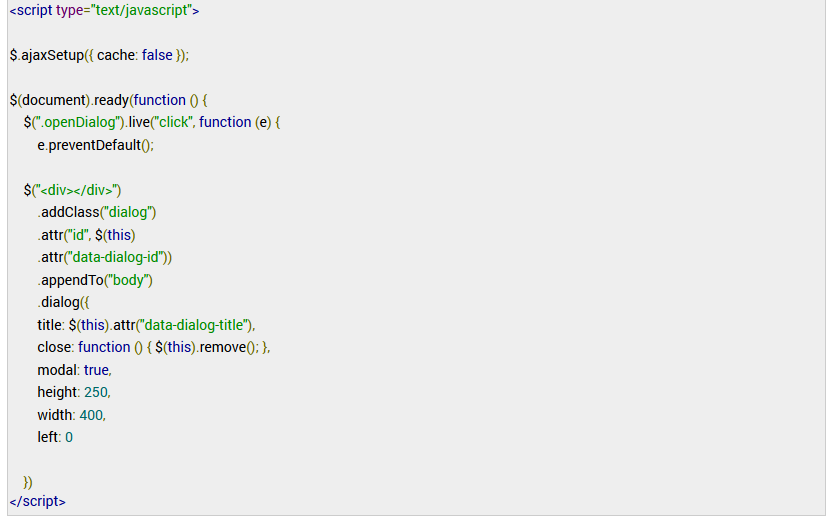
Step 2 : Create a Jquery code required for the modal popup to work. We are using the following 3 properties.
· class – indicates that on click of this link, execute the jquery written above
· data_dialog_id
· data_dialog_title – Used to display the title of the jquery modal popup
Step 3 : Write This Razor code.

Step 4 : Add a new controller called Home and in the Home controller.

Step 5 : Below is the About.cshtml view which will be display by the above (About) action.
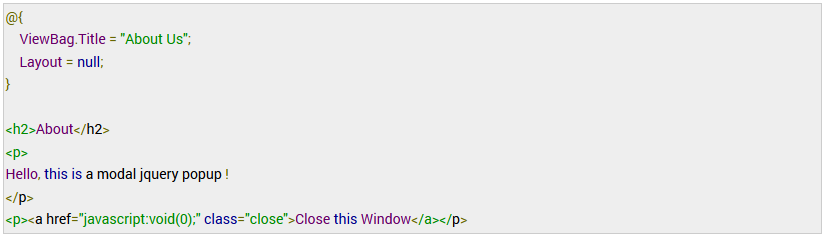
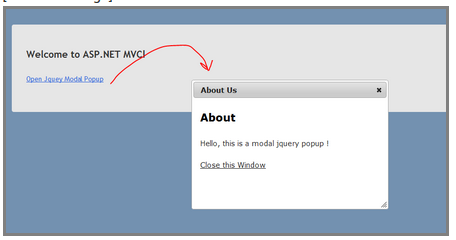
now completes our dialog. Below are the screenshots on how the modal popup appears at runtime.
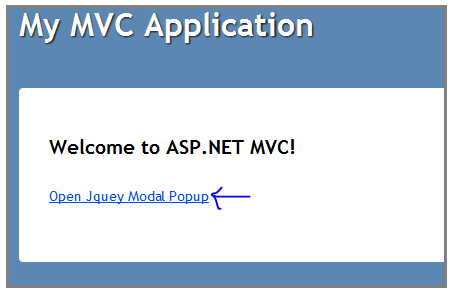
This Is PopUp Window in Our Project
Thanks for reading.